
NIH Salary Cap Handbook
Salary Cap Defined
Salary Cap, per the National Institute of Health (NIH), is a “legislatively mandated provision limiting the direct salary (also known as institution base salary but excluding any fringe benefits and F&A costs), for individuals working on NIH grants and cooperative agreements.” The cap establishes a maximum annual rate of pay at which an individual’s full-time effort over a twelve-month period can be charged.
Salary Cap Memos/Guidance
NOT-OD-26-034: Guidance on Salary Limitation for Grants and Cooperative Agreements FY 2026
NIH Salary Cap (2025-2026)
NIH has issued guidance regarding the current Salary Cap Limitations. The currently effective Executive Level II limitation has been issued an increase from $225,700 (AY $169,275) to $228,000 (AY $171,000). This increase is effective on the first day of the first applicable pay period beginning on or after January 1, 2026.
The limitations are outlined below based on applicability dates.
| Year | Salary Cap FY | Salary Cap AY | Monthly Cap |
|---|---|---|---|
| 2008 | $191,300 | $143,475 | $15,942 |
| 2009 | $196,700 | $147,525 | $16,392 |
| 2010 | $199,700 | $149,775 | $16,642 |
| 2011 | $199,700 | $149,775 | $16,642 |
| Year | Salary Cap FY | Salary Cap AY | Monthly Cap |
|---|---|---|---|
| FY 12 | $179,700 | $134,775 | $14,975 |
| 2014 | $181,500 | $136,126 | $15,125 |
| 2015 | $183,300 | $137,475 | $15,275 |
| 2016 | $185,100 | $138,825 | $15,425 |
| 2017 | $187,000 | $140,250 | $15,583 |
| 2018 | $189,600 | $142,200 | $15,800 |
| 2019 | $192,300 | $144,225 | $16,025 |
| 2020 | $197,300 | $147,975 | $16,442 |
| 2021 | $199,300 | $149,475 | $16,608 |
| 2022 | $203,700 | $152,775 | $16,975 |
| 2023 | $212,100 | $159,075 | $17,675 |
| 2024 | $221,900 | $166,425 | $18,492 |
| 2025 | $225,700 | $169,275 | $18,808 |
| 2026 | $228,000 | $171,000 | $19,000 |
SPS Post Award will continue to mark Sponsored Programs with the applicable rate (ELI or ELII). Please be mindful of these notations when entering cost distributions.
The NIH Salary Cap Guidance can be located at NOT-OD-26-034: Guidance on Salary Limitation for Grants and Cooperative Agreements FY 2026
If you have any questions or concerns, please contact spsacctmgmt@purdue.edu.
Salary Cap Levels
Salary Cap Summary (FY 1990 - Present) | Grants & Funding
Salary Cap Summary (FY 1990 - Present)
FY 2026 Awards Issued
- October 1, 2025 through December 31, 2025 (Executive Level II): $225,700
- January 1, 2026 through September 30, 2026 (Executive Level II): $228,000
FY 2025 Awards Issued
- October 1, 2024 through December 31, 2024 (Executive Level II): $221,900
- January 1, 2025 through September 30, 2025 (Executive Level II): $225,700
FY 2024 Awards Issued
- October 1, 2023 through December 31, 2023 (Executive Level II): $212,100
- January 1, 2024 through September 30, 2024 (Executive Level II): $221,900
FY 2023 Awards Issued
- October 1, 2022 through December 31, 2022 (Executive Level II): $203,700
- January 1, 2023 through September 30, 2023 (Executive Level II): $212,100
FY 2022 Awards Issued
- October 1, 2021 through January 1, 2022 (Executive Level II): $199,300
- January 2, 2022 through September 30, 2022 (Executive Level II): $203,700
FY 2021 Awards Issued
- October 1, 2020 through January 2, 2021 (Executive Level II): $197,300
- January 3, 2021 through September 30, 2021 (Executive Level II): $199,300
FY 2020 Awards Issued
- October 1, 2019 through January 4, 2020 (Executive Level II): $192,300
- January 5, 2020 through September 30, 2020 (Executive Level II): $197,300
Purdue Salary Cap Policy
The management and review of salary cap compliance is a responsibility of both Purdue Sponsored Programs Post Award and Business Office personnel.
Salary cap is a cost share commitment based on an individual’s total effort charged to a sponsored project. Per Purdue processes, in order to be in compliance with NIH’s Salary Cap Policy, the calculated cost share commitment must be met (equal to requirement) or exceeded.
Sponsored Program Post Award reserves the right to make judgment with regard to instances of non-compliance in which PAR adjustments may not be a suitable means for correcting the compliant status. These instances will be reviewed on an individual basis and must be approved by the NSF/DHHS Research Administration Manager.
Salary Cap Expectations
Pre-Award:
- Enter appropriate salaries (including Administrative Supplements) for competing and non-competing proposals being submitted to agencies with Salary Cap Limitations
- Include reference to Salary Cap in the budget justification and indicate ‘Salary Cap’ on the internal proposal route sheet
- Ensure PERA Budget and Cost Share/Salary Cap budgets are available within PERA for Business Office review
Business Office:
- Notify Post Award personnel when a new individual has exceeded the Salary Cap limitation and is paid on a NIH funded research project (46010000)
- Provide Post Award with a Salary Cap budget for the current budget period of the award
- Requested from Pre-Award (in the event that salaries are affected by a funding reduction)
- Developed by Business Office using Salary Cap spreadsheet as projection tool
- Accurately charge salaries to the sponsor account and associated Salary Cap Cost Share account reflecting the percentage of effort identified by the Principal Investigator (PI).
- If effort changes, the distribution should change to ensure appropriate allocation of effort to both the Salary Cap Cost Share account and the Sponsor account.
- Notify Post Award when budget adjustments are required
- Utilize the Sponsored Programs Salary Cap Web Calculator to ensure compliance with Salary Cap regulations.
- Correct any non-compliance issues when identified
Post Award:
- Distribute agency guidelines to all involved University departments
- Meet with Business Offices to provide personalized Salary Cap training to ensure sponsor guidelines are interpreted correctly
- Confirm SPS Audit Report does not include salary cap applicable accounts
Salary Cap at Award Establishment
Sponsored Programs Post Award:
- Establish a separate SP for Salary Cap Cost Share Accounts (each salary capped investigator should have their own SP)
- Indicate appropriate Salary Cap Level in title of SP (i.e. ELII, ELI)
- Title: ‘PI Name’ Salary Cap ‘Salary Cap Level’
- Indicate appropriate Salary Cap Level in title of SP (i.e. ELII, ELI)
- Communicate account information to Business Offices
- Enter budget provided by Business Office
- Header Description of budget should read: ‘Salary Cap’
Salary Cap during the Project
Business Office:
- Must figure and charge salary correctly to the NIH Sponsored Program and the Salary Cap Sponsored Program
- Confirm accuracy of Salary Cap calculations by using the SPS Salary Cap Web Calculator (SPS | DHHS ⇾ Salary Cap)
- Contact SPS concerning discrepancies
- Correct any non-compliance issues when certifying PARs
Salary Cap for Reduced Appointments
In the event that an individual is subject to the salary cap limitations and they are working under a reduced appointment (i.e. 85%), the salary cap calculations will be done based on their full time equivalent.
Salary Cap at Closeout
Sponsored Programs Post Award:
- Determine if Salary Cap cost share requirement has been met
- Contact department if additional adjustments are required into order to bring the award into compliance
- Adjust budget to match actual costs
- Header Description should read: “Salary Cap”
- Print “Compliant” calculator and include with file
- Update comment section of calculator as necessary when addressing issues of non-compliance.
Business Office:
- Make appropriate adjustments in order to bring account into compliance, if necessary.
Salary Cap Resources
- Salary Cap Notice (2026)
NOT-OD-26-034: Guidance on Salary Limitation for Grants and Cooperative Agreements FY 2026 - Salary Cap Notice (2025)
NOT-OD-25-085: Guidance on Salary Limitation for Grants and Cooperative Agreements FY 2025 - Salary Cap Notice (2024)
NOT-OD-24-057: Guidance on Salary Limitation for Grants and Cooperative Agreements FY 2024 (nih.gov) - Salary Cap Notice (2023)
NOT-OD-23-056: Guidance on Salary Limitation for Grants and Cooperative Agreements FY 2023 (nih.gov) - Salary Cap Notice (2022)
NOT-OD-22-076: Guidance on Salary Limitation for Grants and Cooperative Agreements (nih.gov) - Salary Cap Notice (2021)
NOT-OD-21-057: Guidance on Salary Limitation for Grants and Cooperative Agreements FY 2021 (nih.gov) - Salary Cap Notice (2020)
NOT-OD-20-065: Guidance on Salary Limitation for Grants and Cooperative Agreements FY 2020 (nih.gov) - Salary Cap Notice (2019)
NOT-OD-19-099: Guidance on Salary Limitation for Grants and Cooperative Agreements FY 2019 (nih.gov) - Salary Cap Policy FAQ
http://grants.nih.gov/grants/policy/fy2012_salary_cap_faqs.htm - NIH Salary Cap Presentation
PostAwardSalaryCapPresentation.pptx
Sponsored Programs Salary Cap Web Calculator
The DHHS Salary Cap Calculator is a tool developed by Sponsored Program Services in an attempt to provide accurate calculations and efficient delivery of information to ensure University compliance with the associated federal regulations.
The online tool is based on guidance released by the Department of Health and Human Services, i.e. Notice of Salary Limitation on Grants, Cooperative Agreements, and Contracts (NOT-OD-12-035), as well as Purdue University grant administration and SPS processes.
Salary data included within the calculator will be updated monthly (i.e. following the close of each month).
All Business Managers have been granted access to the online calculator.
To grant access to departmental clerical/support staff, business managers can complete the following steps:
- Login to the DHHS/NSF Salary Online Calculator
- Click on “Permission Management” on the top gold menu bar
- Enter individuals Purdue Career Account Username in the search box provided
- Once located, click the “Add Access” button in the search results
- To remove an individual, click on the “remove’ button next to the user information
Salary Cap Web Calculator User Guide
Access Instructions:
- Login to the Online Calculator using your Career Account and Password.
- Please note that permissions must be established for you before you have access to the site.
- Select the DHHS Salary Cap Calculator from either the top gold menu bar or from the button selection at the bottom of the screen.

- There are two search methods available within the calculator.
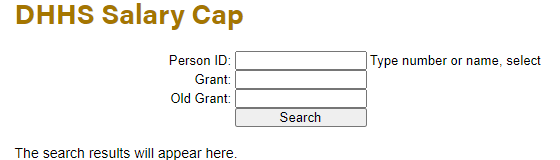
- Search by Person ID
- This feature allows you to enter the Person ID number or name for the individual you wish to review. If the number is unknown, you can utilize the ‘Look Up’ button located directly to the right of the Person ID text field.
- Search by Grant Number
- Enter the grant number in which you wish to review and click ‘Search’.
- If an incorrect or non-salary cap applicable Person ID or Grant Number is entered, the following error message will display.

- If you believe that this message was received in error, please contact spsacctmgmt@groups.purdue.edu
- Once an individual or a grant has been selected, the following screen will appear

Site Features:
- Person ID
- In the event that a grant that has been selected includes multiple individuals subject to salary cap, you will be able to toggle between the Person ID numbers as shown below:

- Grant Number
- As with the Person ID Number, if an individual selected is paid on multiple DHHS funded projects, you will be able to toggle between multiple grants within the same screen

- Grant Statuses will be indicated in red above the grant number selected.
- Only those grants in “Approved Award”, “Expired”, or “Notice to Proceed” status will display in this screen.
- Data
- This section provides monthly data for charges posting to the sponsored programs associated with the Person ID, Grant, and Executive Level selected.
- Full Time Period Rate
- Individuals monthly salary plus any administrative adjustments
- Effort
- Total effort charged to the project (both Sponsor and Salary Cap Cost Share Accounts)
- Cost Per Month
- Total Salary charged to the project based on Full Time Period Rate and total Effort
- This is actual data pulled from monthly payroll reports
- NIH Salary Cap
- Total amount allowable on the Sponsored Account per NIH guidelines (effort times applicable salary cap rate)
- Percent to NIH SP
- Total amount of effort to be charged to the Sponsored Account based on Salary Cap calculation
- Difference (Amt. to charge to Cost Share SP)
- Difference between the total salary charged to the project and the total salary allowable on the Sponsored SP per the salary cap calculation
- Percent to charge to CS SP
- Percent of effort to be charged to the Salary Cap Cost Share account
- Full Time Period Rate
- This section provides monthly data for charges posting to the sponsored programs associated with the Person ID, Grant, and Executive Level selected.
- Summary Box

- This area provides a summary of the data fields and indicates compliance with the salary cap limitation based on the Person ID, Grant Number, and Executive Level selected.
- Grant Total is the total amount of salary charged to the project.
- Linked field provides complete payroll data
- Total amount that should have been charged to the Sponsored SP based on the applicable salary cap rate and the individual’s salary and effort.
- Total amount that should have been charged to the Salary Cap CS SP based on the applicable salary cap rate and the individual’s salary and effort.
- Actual salary charged to the Salary Cap CS SP based on payroll records.
- Linked field provides complete payroll data
- Difference between the amount that SHOULD have charged to the Salary Cap CS SP (D) and the ACTUAL amount that charged to the Salary Cap CS SP (E).
- Compliant Status
- If the Salary Cap requirements have been met, then a green “compliant” will appear
- If the Salary Cap Requirements have NOT been met, then a red “non-compliant” will appear
- Notes for Business Managers
- A text field has been added where notes form both Business Office Staff and Sponsored Program Staff can be entered.
- All notes entered will be time stamped and cannot be deleted.

- Print Preview

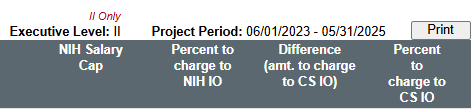
- Allows you to print the full calculator for the Person ID, Grant, and Executive Level selected
- The Notes for Business Managers will print for Business Office Personnel
- SPS will utilize a print function that does not include the Notes for Business Managers
- Allows you to print the full calculator for the Person ID, Grant, and Executive Level selected
Reports:
Reports can be run using the following filters:
- Person ID
- Grant Number
- Executive Level
- Award Status (Defaults to ALL NON-CLOSED)
- Salary Cap Status
- Campus
- College
- Org Unit/Name
The Reports page will allow the user to search by any of the above listed criteria to develop a report that best suits the need of their business unit. SPS encourages business offices to run a report to identify NON-COMPLAINT status at the end of each PAR period, at minimum.
Example:

