Prinitng and protyping

3D printing


Bring the following to your reservation:

  • Laptop that can view and modify the CAD file that you are trying to 3D print. It will also be used to check that you have the appropriate Safety Trainings for this reservation
  • STL file of the model
  • The ability to transport the file from that laptop to one of the BIDC 229 Computers (either a USB-A flash drive, any Cloud transfer program such as Dropbox or Google Drive, or emailing it to yourself after logging into the lab’s computers will work)

During this reservation, depending on the 3D printer used, you will use either Markforged Eiger or Formlabs PreForm to prepare your 3D print for 3D printing. At this point, the 3D print will be correctly oriented and, if necessary, modified, in order to successfully 3D print the model using the optimal 3D printer technology and 3D print material.

Some of our 3D printing technologies require post-processing, which involves the student cleaning the model after 3D printing and before part usage. Before leaving the 3D printing reservation (as you do not need to stay for the whole 3D print), make sure to reserve time on the appropriate post-processing machine.

The primary materials listed with each 3D printer are the materials that the lab regularly supplies and makes available for student use. If none of the materials stocked at the Bechtel Center are compatible with a given project, students are welcomed to bring in their own materials to use, provided students follow lab bring-your-own material procedures. Every new material must first be registered and approved as a chemical per the center’s chemical policy. See each 3D printer for specific details.
Manufacturer: Formlabs
Model: Fuse 1
Design Guide
Primary Material:  Nylon 12 Gray
Note: The Fuse 1 sometimes runs in batches to minimize wasted material, so multiple reservations will sometimes need to coordinate (through peer mentors) to get multiple 3D prints listed as the same reservation.
Required Post-Processing: Fuse Sift
Key Specs:
XYZ Build Volume: 165 × 165 × 300 mm
Z-Resolution: 110 μm
Bring your own material:
Bring-your-own-material is not currently supported for the Fuse 1

Manufacturer: Formlabs
Model: Form 3B+
Design Guide
Primary Materials: Castable Wax v1High Temp v2Elastic 50A v1Rigid 10k v1BioMed Clear v1
Required Post-Processing:  Form Wash & Form Cure
Optional Post-Processing: Post-Processing Hand Tools
Key Specs:
XYZ Build Volume: 145 × 145 × 185 mm
Z Layer Resolution: 25 μm – 300 μm
Bring your own material:
All resins from Formlabs’ compatibility page that are listed as compatible with the Form 3B+ are acceptable, but keep in mind that some of these materials require advanced post-processing techniques that the Bechtel Center currently does not support.
Any student wishing to bring in their own Formlabs resin must also provide their own Form 3B+ Build Platform and Resin Tank v2.1. They must also provide their own cleaning tank (although for certain resins they can use the lab’s cleaning tank. Isopropanol will always be provided).

Manufacturer: Markforged
Model: X7
Design Guide
Primary Materials: Onyx®, Smooth TPU
Composite Reinforcement Materials: Aramid, Carbon Fiber, Fiberglass
Note: Smooth TPU is not compatible with any reinforcement material
Required Post-Processing: None
Key Specs:
XYZ Build Volume: 330 x 270 x 200 mm
Z Layer Resolution: 100 μm – 200 μm
Bring your own material:
Check 3D printer/material compatibility here
To use your own Markforged filament or reinforcement, bring the spool with you and a peer mentor will teach you how to load it into the 3D printer. It MUST be Markforged in order to be compatible with this 3D printer.

Manufacturer: Markforged
Model: Mark 2 (Gen 1)
Design Guide
Primary Materials: Onyx®
Composite Reinforcement Materials: Aramid, Carbon Fiber, Fiberglass
Required Post-Processing: None
Key Specs:
XYZ Build Volume: 320 x 132 x 154 mm
Z Layer Resolution: 100 μm – 200 μm
Bring your own material:
Check 3D printer/material compatibility here
To use your own Markforged filament or reinforcement, bring the spool with you and a peer mentor will teach you how to load it into the 3D printer. It MUST be Markforged in order to be compatible with this 3D printer.

Manufacturer: Bambu Labs
Model: P1S
Design Guide
Primary Materials: PLA, PETG, TPU, PVA, PET, ABS, ASA
Required Post-Processing: None
Key Specs:
XYZ Build Volume: 256 x 256 x 256 mm3
Bring your own material:

Laser Cutting

File Format

There a number of file formats that can be used for laser cutting / engraving. The following are the most common file formats:

  • DXF or DWG – AutoCAD format
    • This is best for cutting operations. Easy to generate from most 3D CAD programs.
  • AI – Adobe Illustrator format
    • This is good for engraving and cutting.
  • SVG – Vector and raster file format
    • This is OK for engraving and cutting, prefer Adobe Illustrator.
  • PDF
    • This is OK for engraving and cutting, prefer Adobe Illustrator.
  • Image files: PNG, JPG, BMP, …
    • Raster files for engraving only.

Lineweight and color

Lineweights and colors are critical in setting up cut lines in a program. If you do not follow these instructions your job will not work.

  • Black is used for engraving (R0,G0,B0)
  • Red is used for cutting the outside border* (R255,G0,B0)*
  • Blue and Green are used for cutting internal holes or scoring (R0,G0,B255 or R0,G255,B0)

Color

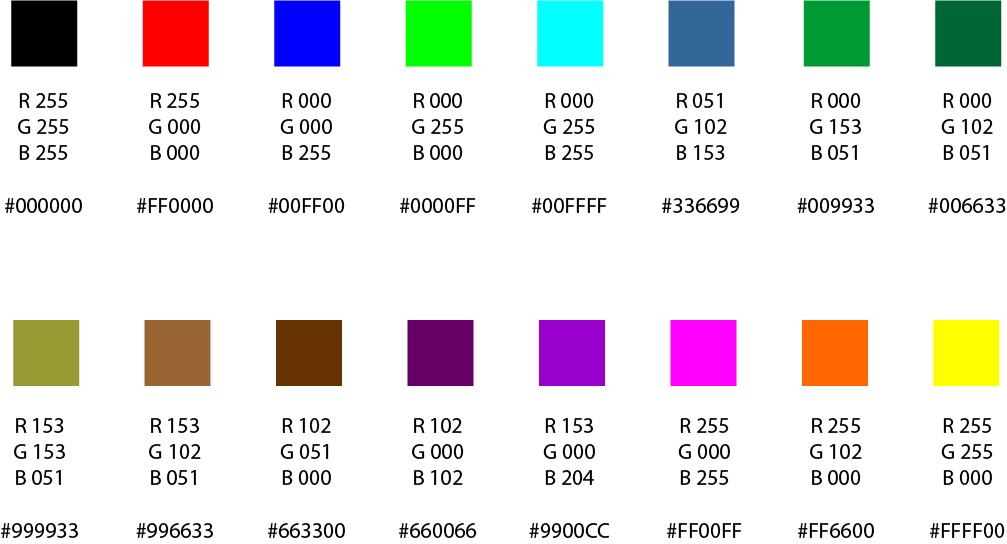
These are the only colors the laser will recognize:

List of colors the laser cutter will recognize

Lineweight

For cut lines you will want the line weight to be set to the following:

  • AutoCAD → 0.00mm or 0.00in
  • Inkscape → 0.5pt or less (this will be called stroke)
  • Adobe Illustrator → 0.001pt (this will be called stroke)

Additional Process

To better optimize your job in AutoCAD:

  • Select everything (ctrl A)
  • Type Join into the command prompt and hit enter

This will combine most closed shapes into a continuous line. Which the laser will then cut out as one line instead of a bunch of line segments. This will produce better results and decrease the cut time.

3D Printing

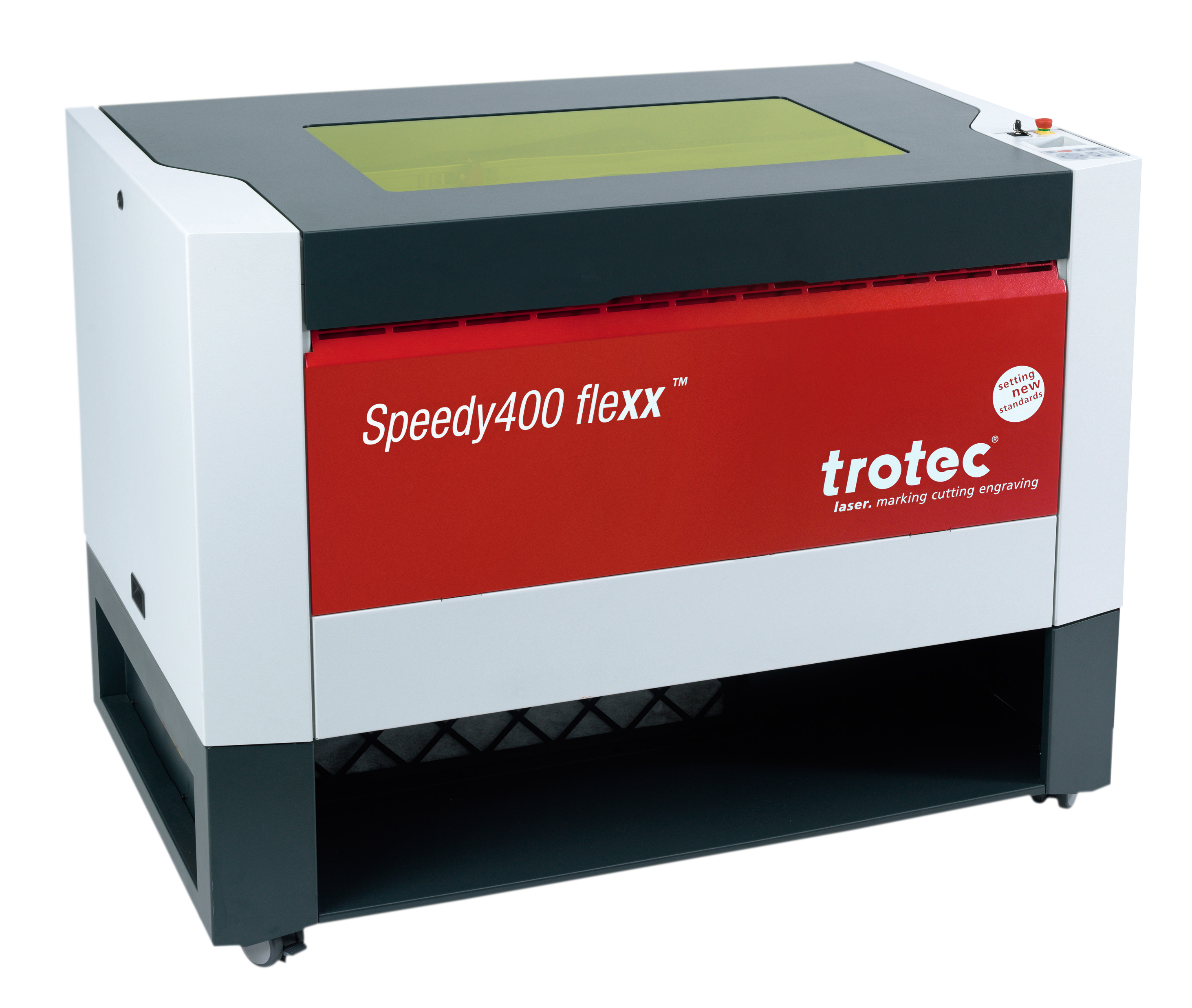
Manufacturer: Trotec
Model: Speedy 400 Flexx
Materials:

  • Pre-approved materials:
    • Plywood, balsa, softwoods, hardwoods
    • Acrylic
    • HDPE – tends to melt for sheets thicker than 1/8″
    • Cardboard
    • Cotton fabric / felt / genuine leather
    • Paper / cardstock
    • Poster board / foam board
    • Trotec brand materials
    • Certain uncoated metals
  • Consult with the Peer Mentor:
    • Certain coated metals
    • ABS
    • Any material containing carbon, zinc due to potential fire or poison
    • Polycarbonate or Lexan
    • Any materials not listed elsewhere
  • Prohibited materials:
    • Any unknown material – you must know what you are cutting
    • Materials containing bromine – usually anything flame retardant
    • PVC
    • PET
    • Vinyl
    • Fiberglass
    • Polystyrene / polypropylene foam
    • Carbon Fiber

Key Specs:
Cut Area: 39” x 24”
Max Height of Workpiece: 0.5” or thinner (Depending on material and settings)
Max Processing Speed: 4.2m/sec
Laser Power: 60-250 watts (CO2), 20-50 watts (Fiber)
Laser Kerf: 0.005-0.01” (Depending on material and settings)

3D Printing

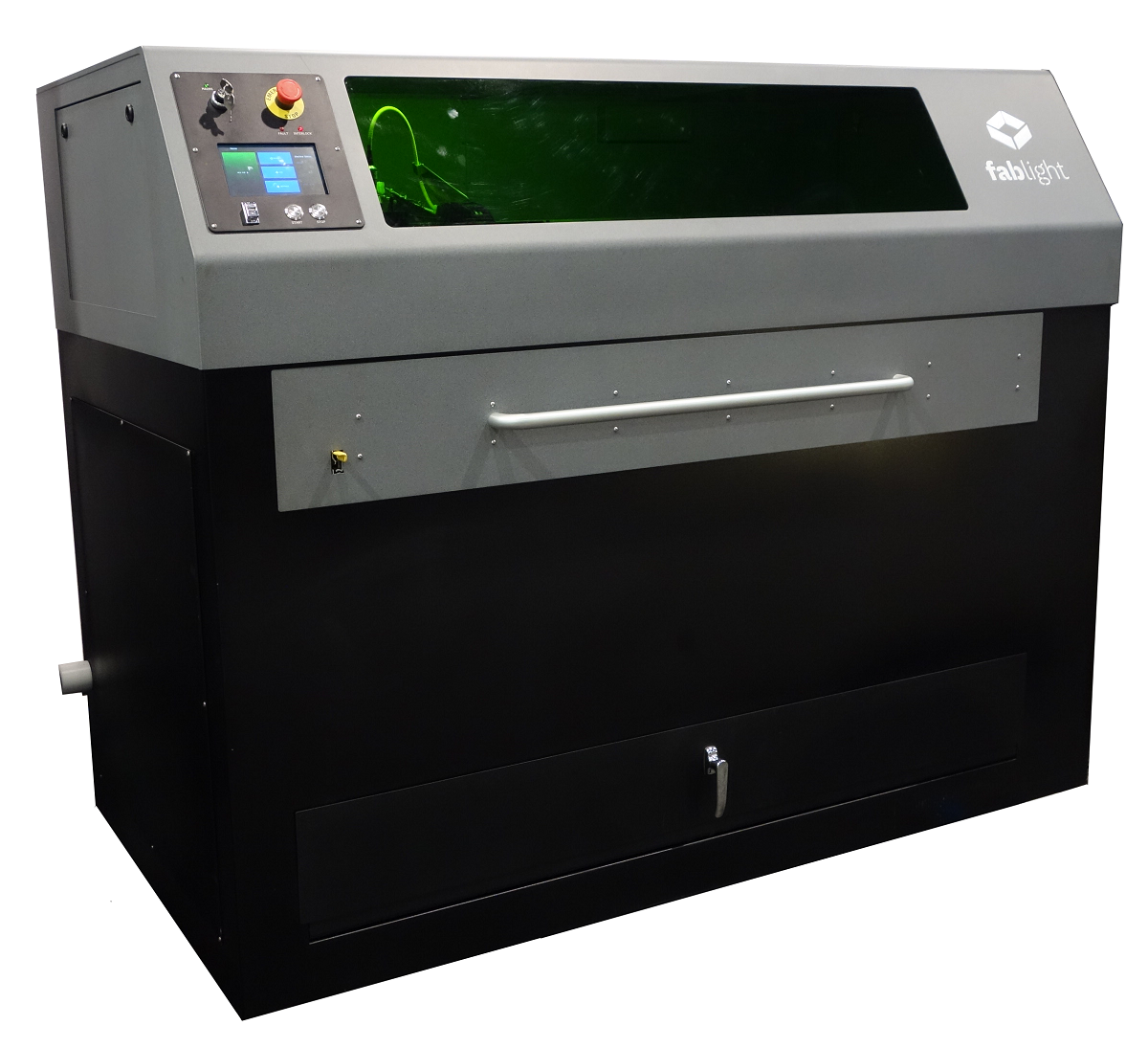
Manufacturer: Fablight
Model: FL4500 Tube and Sheet
Material Requirements:

  • Sheets should be large enough to allow for a ¼” border of excess material around the anticipated job
    • Example: You want to cut out a 10” x 10” design so you bring a 10.5” x 10.5” sheet of material
  • Sheets should be 5” x 5” at a minimum due to the spacing of the grid
  • Consult with a Peer Mentor for special cases

Materials:

  • Pre-approved materials:
    • Mild Steel (Up to 1/4” thick)
    • Stainless Steel (Up to 3/16” thick)
    • Aluminum (Up to 1/8” thick)
    • Copper, Brass, Bronze (Up to 1/16” thick)
    • Titanium
    • Molybdenum
    • Graphite
    • Certain alloys
  • Consult with a Peer Mentor:
    • Any materials not listed elsewhere
  • Prohibited materials:
    • Galvanized metals
    • Certain coated metals

Key Specs:
Sheet Cut Area: 50” x 25”
Tube Cut Diameter: 0.5” to 2”
Tube Max Length: 80”
Max Height of Workpiece: 1/4” or thinner (Depending on material and settings)
Max Processing Speed: 50”/sec
Laser Power: 4500 watts pulsed (Fiber), 450 watts continuous (Fiber)
Laser Kerf: 0.005-0.01” (Depending on material and settings)