YuJa Panorama Instructor Guide: Alternative Formats Offered
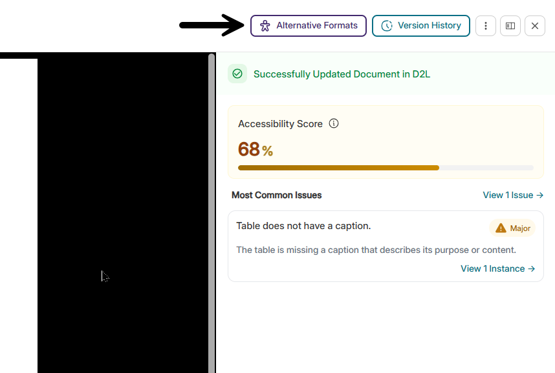
Panorama offers many alternative formats, both in the student and instructor view. To access the Alternative Formats window, click the indicator icon to the right of a file. Then click “Alternative Formats.”
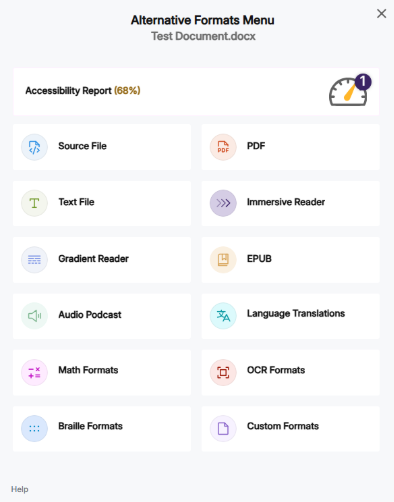
Alternative Formats Defined:
- Source File: View the document in its original format, suitable for download viewing.
- PDF: View the document in PDF format, suitable for both online and download viewing.
- Text File: View the document in a pure text format without any formatting styles, suitable for both online and download viewing.
- Immersive Reader: Allows for cCustomizations to text preferences, grammar options, and reading preferences while following along with the audio playback.
- Gradient Reader: Enhances visual word recognition when reading by providing a guiding color gradient.
- EPUB: View the document in the ebook format, suitable for any ebook reader application.
- Audio Podcast: Audio playback for documents, suitable for both online and download listening.
- Language Translation: Translate a document automatically to over 100 languages, which can be downloaded
- Math Formats: Convert documents containing math equations into LaTeX, Math Text (i.e. numbers and symbols to words), or MP3 files.
- Latex: Convert documents into LaTeX document format.
- Math Text: Convert documents into printed English, including numbers and symbols.
- Math Audio: Convert documents to MP3.
- MathML: Extract mathematical equations from documents and convert them into HTML files.
- OCR Formats: Convert images with text into machine-encoded text that can be searched and read by screen readers.
- OCR Overlaid Tagged PDF: Generate a tagged PDF that allows for selectable text overlaid on the original scanned document or image.
- OCR Reconstructed DOCX: Generate a brand new DOCX file from scanned documents or images.
- OCR Reconstructed Tagged PDF: Generate a brand new tagged PDF from the scanned document or image.
- OCR Reconstructed HTML: Generate a brand new HTML file from scanned documents or images.
- OCR Text: Recommended for those who’d like plain text, the OCR tool will extract and display text within images and GIFs as a TXT file.\
- OCR Audio: Extract text within images and GIFs into an MP3 text-to-speech audio player.
- OCR Semantic Text: Converts scanned text into readable, structured text while preserving context and layout.
- OCR Semantic Audio: Transforms scanned text into audio with natural intonation and emphasis, enhancing listening comprehension.
- Braille: View the document in the braille grade 2 format, suitable for download viewing (a braille reader is required).
- Custom Formats