SuccessFactors and Employee Self-Service
SuccessFactors is Purdue's cloud-based Human Capital Management (HCM) tool to manage core HR processes, such as payroll, talent management, recruitment and more. Employees access SuccessFactors to update personal and direct deposit information, complete time off requests or time sheets, create goals and complete staff performance appraisals. Supervisors and administrative roles complete the hiring process, onboarding and more.
Learn how to use SuccessFactors with these videos, quick reference guides and links to additional resources.
Watch this video to learn more about navigating the SuccessFactors home page, understanding and updating important information in your profile. All employees can update their education, address and contact information, direct deposit and bank information, state and federal tax withholding and more. (Click image to open video in new window.)

Additional Resources:
The Mobile App was introduced in 2023. This quick video shows how to connect and use this app.

For Concurrent Employees (multiple positions) view correct position.
Supervisors will also get notifications to approve through Teams, such as time off requests, timesheets and will be able to do most of those approvals without needing to go to SuccessFactors.
Learn how to access the SuccessFactors app:
SuccessFactors app in Teams (Quick Reference Guide)
To view available job opportunities at Purdue, external candidates will access careers.purdue.edu. Internal candidates will log into SuccessFactors and select Careers from the Home dropdown menu (it is not a quick action tile).
Position descriptions for available jobs generally contain the job's career stream, including its pay band.
Joule offers a basic introduction to AI within SuccessFactors. It’s an AI tool that is designed to help end users complete certain tasks by expediting them. Additional functions will be added in the future to continue improving the tool.
Joule aims to understand users requests, retrieve information and complete tasks in a conversational way. For example, instead of manually navigating to a feature or page, users can describe the current task to Joule, who can help automate tasks or help find desired data. Joule's goal is to simplify interactions with the system and increase productivity.
Example functions:
- View email addresses, phone numbers and locations
- View leave balances
- View direct reports, department, division, direct manager
Learn more about Joule:
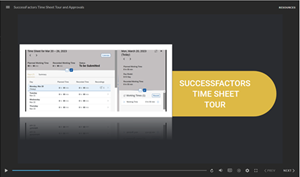
Watch this video to learn more about completing and approving time sheets. (Click image to open video in new window.)
Additional Resources:
- Pay @ Purdue web page
- Time profile information
- Employee timekeeping resources
- Supervisor timekeeping and approval resources
- WebClock reference materials
- Access your pay statement
Employment Center and Administrative Resources:
Employees use the Request Time Off Quick Action tile to submit all time off requests. Supervisors receive email notifications when a request is made. The request also appears under 'Approvals' until approved.
Additional Resources:
- Request Time Off Quick Reference Guide
- Approve Time Off Request Quick Reference Guide
- Personal Leave
- FMLA and Paid Parental Leave
- Business Leaves
- Other Leaves
Employment Center and Administrative Resources:
The Learning option from the SuccessFactors home page drop down menu opens Purdue's Learning Management System (LMS) for employees. For a visual guide to finding the Learning area, visit the Quick Reference Guide to Access SuccessFactors Learning
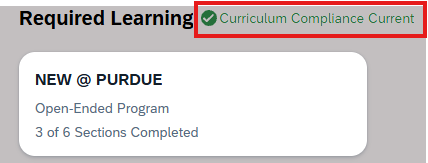
From the SuccessFactors LMS homepage, you can view Required Learning. You can click on the SuccessFactors Curriculum Compliance link there to learn more.
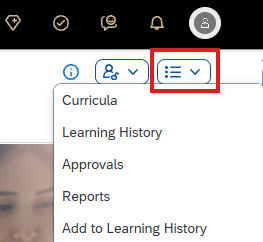
To view items, such as Learning History, click the drop-down list on the right side of the screen.
Additional Resources:
- SuccessFactors Learning Quick Reference Guides for Employees and Supervisors
- Employment Certifications web page
- WebCert Catalog home page
- Employment Certifications link in SuccessFactors
A position must be in the system before the recruitment or hiring process may begin. Supervisors and Department Administrative roles, along with HR Compensation and Employment Centers, all play a role in creating and maintaining positions.
Organizational Structure and Position Management web page
All positions have 'roles' assigned to them within SuccessFactors that provides permission to access specific tiles or functions. If you are creating a new position, work with your HR team to ensure the correct roles are assigned.
Employment Center and Administrative Resources:Supervisors and Department Administrative roles have the ability to initiate and complete the hiring process.
- They initiate the requisition for staff positions and work with the Talent Acquisition team through the hiring steps.
- They initiate the requisition and complete all hiring steps for the student and grad student appointments and/or partner with their Employment Center to process via Action Automation.
- They initiate the requisition and complete the quick hire process for Lecturer appointments.
- They initiate the requisition and follow the Faculty hiring process for faculty positions.
Additional Resources:
Employment Center and Administrative Resources:
Supervisors and Department Administrative roles, along with Talent Acquisition and Employment Centers, all play a role in onboarding new hires.
- Hiring Supervisors and Onboarding Coordinator First Steps web page
- Form I-9 Frequently Asked Questions
- New Employee Onboarding First Steps
- Employment Centers
- Onboarding New Employees web page
- New@Purdue web page
Employment Center and Administrative Resources:
Staff complete goals and annual performance appraisals.
Purdue University boosts its talent engagement through supervisor and employee empowerment. Purdue supervisors provide performance & potential ratings and ensures performance related transparency and accountability. The employee plays an active role in their career planning by fostering a proactive culture of professional development and continuous growth. The goal is to enhance clarity in career progression as employees better understand actions required to achieve their career goals.
Learn more about how to update your talent profile portlets here.
Additional Employee Self-Service items
Review the Tax Services web page to edit state and federal tax withholding, access Glacier (Nonresident Alien Tax Compliance System) and request online W-2 services.
For tax related questions contact, tax@purdue.edu
At the time of hire, all newly hired employees are automatically assigned default tax withholding values.
Default withholding elections:
- Federal Tax: Single rate
- State Tax: 0 allowances
Important: Under Onboarding 2.0, tax forms are not completed during the onboarding process as default elections are initially used as noted above. New employees may update their tax withholding information after hire to ensure it accurately reflects their personal tax situation.
NOTE: International employees’ tax withholding information is automatically set as follows.
- Federal Tax: IRS required Single-Nonresident Alien rate,
- State Tax: 0 allowances.