Skip to content
Purdue Logo Innovative Learning
  • Contact Us
Search for:
  • Home
  • Programs
    • IMPACT
    • Teaching@Purdue
    • College Teaching Development Program
    • TLCoP
    • CoPILOT Program
    • SoTL Fellowship
    • Student Pedagogy Advocates
  • Services
    • Online Courses/Programs Development
    • Teaching & Learning Feedback
    • Instructional Data Processing (IDP)
    • Video Production
  • Events
  • Tools & Resources
    • Course Design & Development Process
    • Instructional Technology
    • Accessibility and ADA Title II
    • AI Bytes Workshop Sessions
    • Purdue Syllabus Guidelines
    • IL Teaching Guides
      • Instructional Video
      • Hy-Flex and Resilient Pedagogy Resources
      • Tips for enhancing engagement
      • Student Toolkit
      • First Year Online
    • PoRTAL
    • Global Learning
    • Scholarship of Teaching and Learning
    • Awards
    • Teaching Excellence
    • Virtual Labs
    • Semester Resources
    • Learning Remotely
    • Intellectual Property Policy for Instruction
    • SEISMIC
    • Libraries Instructional Resources
  • About Us
    • What is IL?
    • IL Units
      • Center for Instructional Excellence Directory
      • Libraries and School of Information Studies Directory
      • Purdue Online Directory
  • News
  • Indianapolis Faculty

Respondus: Disable Environment Check (Room Scan)

Per policy, environmental checks and room scans should not be used with Purdue assessments using supported proctoring tools.

Read more»
 

Proctored Exams Environmental Scan


Guidance Updated September 6, 2023

A 2022 district court case in Ohio found room scans during online exams to be unconstitutional.  As a result, the guidance from Purdue’s Office of the Provost and Purdue’s Office of Legal Counsel is to avoid any implementation of “room scans” at the Purdue West Lafayette campus.

In Respondus Monitor, this means turning off the “Environmental Check” feature.  In other proctoring tools (including Honorlock), this means not asking students to scan their room as a part of any online quiz or exam.

Should a student encounter an assessment where the room scan feature is enabled and the student is uncomfortable proceeding with this technology in place, the student is advised to contact their instructor immediately and work with them to identify an alternative method of completing the assessment.  If students need further support with this, they may connect with Purdue’s Office of Student Rights and Responsibilities at:

Office of Student Rights and Responsibilities
Helen B. Schleman Hall
656 Oval Drive; 2nd Floor
West Lafayette, IN 47907-2086
Email: osrr@purdue.edu

We understand this guidance may elicit concerns about integrity.  This document on exam and academic integrity may help instructor think about how to keep your assessments secure.  Please contact InnovativeLearningTeam@purdue.edu for help with alternatives.


If you use Respondus Monitor, please follow these instructions to turn off the Environment Check feature:

  1. In your Brightspace course, click Course Tools, and select Quizzes from the drop-down.
  2. Click the LockDown Browser tab.
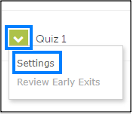
  3. Click the drop-down arrow to the left of the quiz and select Settings.
  4. In the Startup Sequence section, uncheck the Environment Check option.
  5. Click Save + Close.

  • New Brightspace Tool Integration  
  • Support & Training
  • Request a New Tool
  • Instructional Technology Portfolio Home

Request a Consultation

Purdue Logo

An equal access/equal opportunity university
Copyright Complaints

Trouble with this page?

Disability-related accessibility issue?

Please contact ITaP at itap@purdue.edu.

Address

Purdue University Innovative Learning
Fourth Floor of Young Hall
West Lafayette, IN 47907

Contact Us

765-494-4600

Email Us

Follow Us

  • Facebook
  • Twitter
  • LinkedIn
  • Instagram
  • Youtube
  • snapchat

Last modified: September 18, 2023

Copyright © 2025 Purdue University. All Rights Reserved. Trademark Statement.
Accessibility | EA/EO University | Integrity Statement | Free Expression | DOE Degree Scorecards | Privacy Policy