Pathway
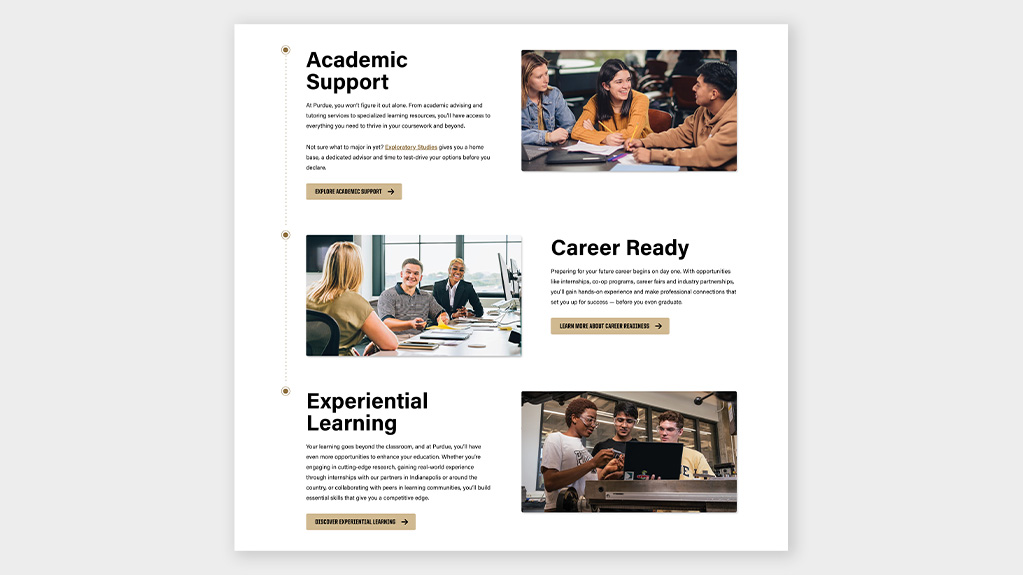
Block that links multiple sections together and offers multiple call to action type interactions.
Jump to:
| Category | CMS |
|---|---|
| Interaction | WordPress |
Instructions
Settings:
- Choose the type of this block: aligned, full width
- Align content: left, right
- Heading level of the header: H2, H3, H4, H5, H6
- Add connector to next block: checkbox
- Connector type: straight, elbow (shown when add connector is checked)
- Is this the first one: checkbox
- Is this the last one: checkbox
- Choose how to display the links: buttons, dropdown
- Choose type of image: horizontal, square (aligned type only)
- Description of the links: text
- Links:
- Link text: text
- Link URL: URL
- Open link in new tab: checkbox
- Button color (buttons display only): gold, black, white
- Make it full width (buttons display only): checkbox
- Button CSS class: text
- Dropdown button CSS class: text (dropdown display only)
- HTML anchor: text
- Media:
- Image: image (upload/select)
Note: Blocks are connected by adding multiple pathway blocks to the page. Check the block options if the block is the first or last in the group.
Keep copy to a minimum for this block, its intended use is to provide visitors with links to other content.
Smaller image size: 712 by 400 px (16:9)
Larger image size: 1344 x 756 px (16:9)
Note: for full width image option note which side to focus on when cropping.
Live Block
Example 1 of 1

Section header
Header
Body copy
Description of links:

Section header
Header
Body copy

Section header
Header
Body copy
Description of links: